Discovery & process mapping
Interviews across production, logistics, and sales; mapping the order lifecycle and the 1C data contract; and the on-premise and data-ownership posture.

Case study · Manufacturing · Production management
How we shipped StartApp from scratch — a unified ecosystem that connects mobile apps for iOS and Android with an administrative web console, tracks every order across its full lifecycle from the shop floor to shipping, opens direct communication channels with counterparties, and integrates two-way with the client's existing 1C accounting system, all running on the client's own servers.

The client is a large federal furniture manufacturer running several production facilities alongside logistics and sales. As order volume grew, coordination between production, logistics, and the sales floor was held together by phone calls and scattered messengers, and customers and counterparties called constantly just to learn the status of an order. The brief was to make order status transparent without calls to the shop floor, open a direct communication channel with counterparties, centralize the employee and customer database, and cut call-center load by shifting communication to an asynchronous, self-service model — all deployed on-premise, on the client's own infrastructure, and integrated with the legacy 1C accounting system.
A snapshot of what StartApp delivered across three platforms and a controller for the client's own servers in its first production cycle.
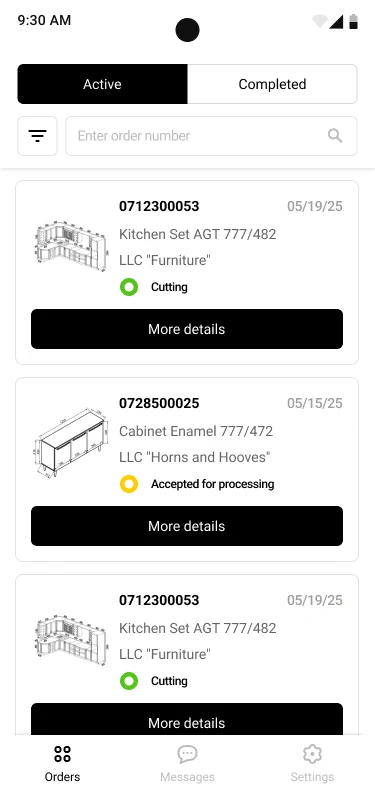
The mobile clients for iOS and Android are built on Flutter, so a single codebase ships to both platforms in lockstep — the right trade-off when dozens of counterparties' employees use the app at once and the delivery window is fixed. The home screen is an order feed with Active and Completed tabs and search by order number; each card carries a product thumbnail, the order number, the date, the counterparty company, and a colour-coded status such as Cutting or Accepted for processing.
The point of the feed is to end the status phone call. Statuses come straight from the accounting system, so what a shop-floor worker or a salesperson sees on the card is what the back office sees — no one has to call the factory to find out where an order stands.
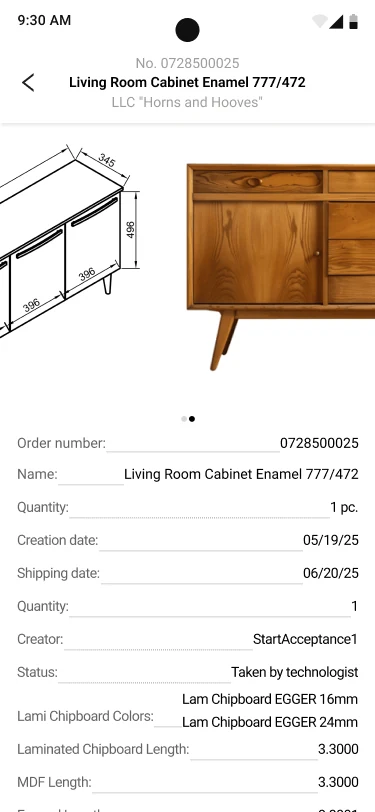
Tapping an order opens a card that gathers everything the shop floor needs: a technical drawing and a photo of the item, the order number and name, quantity, creation and shipping dates, the creator, and the current status such as Taken by technologist. Below that sit the production parameters — chipboard colours and the chipboard and MDF footage.
All of it is pulled from the accounting system through the two-way 1C integration, so the card always matches the back office. The manufacturer stops maintaining two versions of the truth, and a counterparty can self-serve the exact spec of what they ordered.
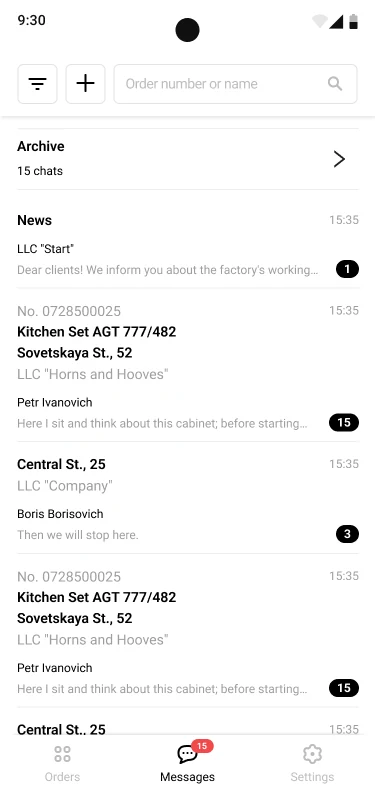
The Messages section is a chat feed: an archive, company news, and conversations bound to a specific order and delivery address, each with a last message, a timestamp, and an unread counter. Inside an order chat, participants discuss details and exchange attachments — photos of items, drawings, samples — with a gallery that folds extra images into a +N tile.
Consolidating this out of personal messengers is the other half of the call-center win: the whole history for an order lives in one place, visible to exactly the people in the loop, and response times to counterparties improved once the scattered chats moved into the single corporate platform.
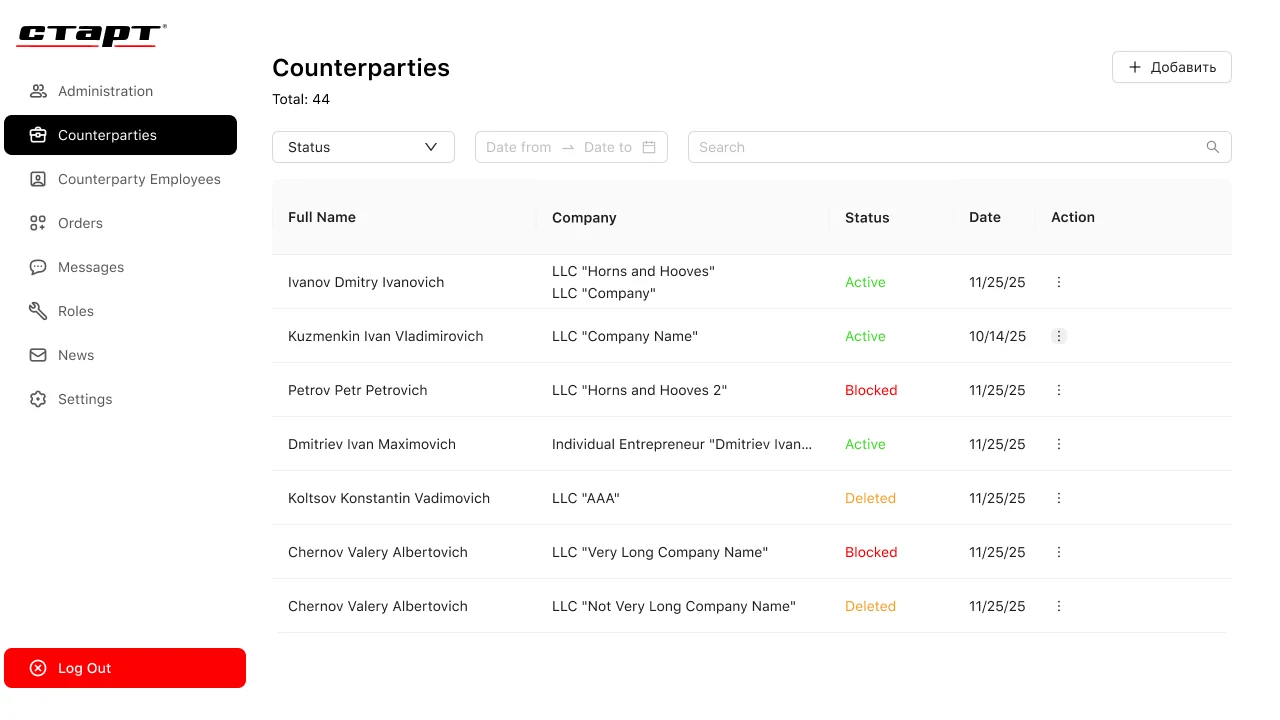
The administrative side is a React web application that gives the back office a large screen for the work that does not belong on a phone. The Counterparties module is a table of every company with filters by status and date and a search field; Active, Blocked, and Deleted states are colour-coded so an operator can triage at a glance.
A left-hand rail navigates the whole system — administration, counterparties, counterparty employees, orders, messages, roles, and news — so one console owns the entire ecosystem while the mobile apps stay light and focused on orders and communication.
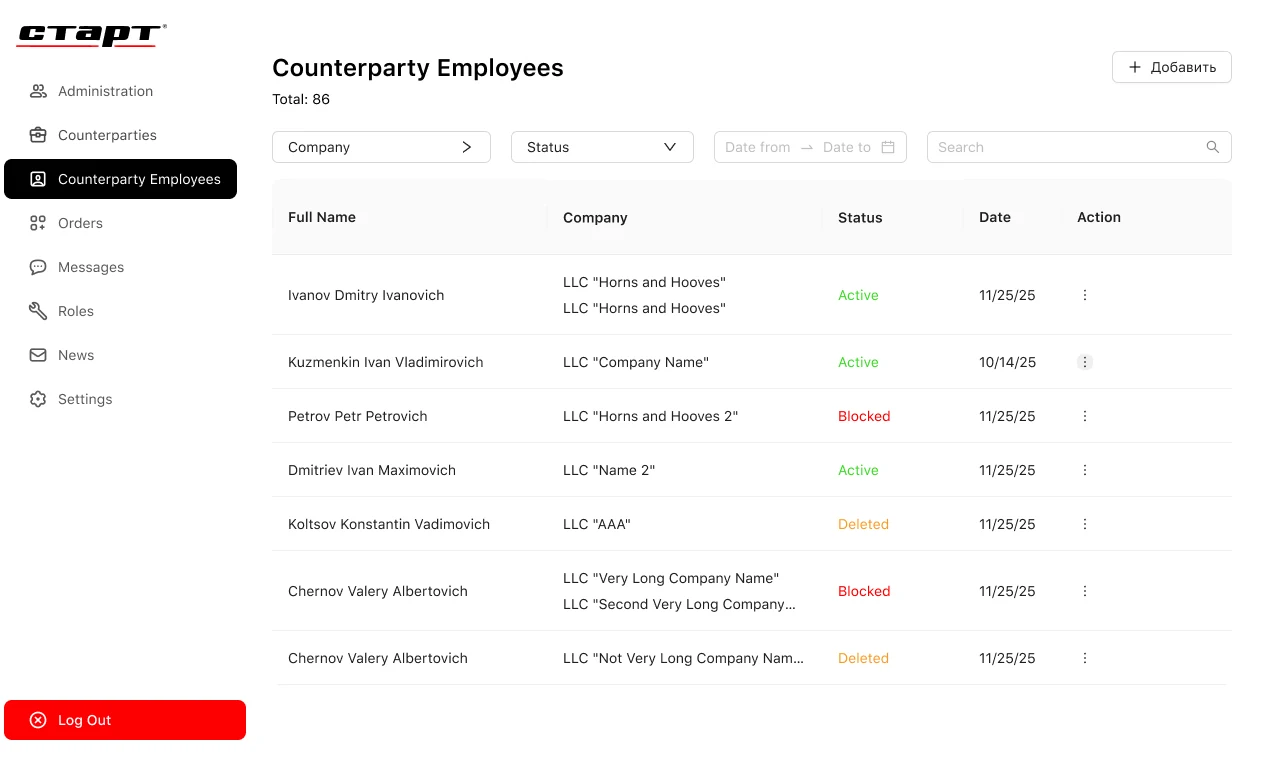
The Counterparty Employees module lists people across every company with filters by company and status, backed by a roles module that separates access rights and a dashboard that gathers performance metrics. One employee can belong to several legal entities, and the centralized database removes the confusion over who owns which order.
Because the manufacturer owns this control plane rather than renting a third-party service, order, counterparty, and conversation data stays inside the company perimeter — the on-premise deployment turns data ownership into the default rather than a later retrofit.
A five-phase Agile build that took StartApp from scattered phone calls to a single production-management platform over ten months.
Interviews across production, logistics, and sales; mapping the order lifecycle and the 1C data contract; and the on-premise and data-ownership posture.
A Laravel control plane, the REST API for the apps and console, the roles model, and the two-way 1C exchange contract.
Flutter iOS and Android clients and the React admin console — order feed, order card, order-scoped chats, counterparty and employee modules.
Two-way 1C sync, closed communication loops, role-based access, and testing across a wide range of counterparty devices.
On-premise rollout, a pilot that cut status calls by ~30%, and Agile iteration on chats and the admin console from real usage.
The roadmap builds on the same server foundation: push notifications on status changes, analytics on production timelines and facility load, a deeper role model, and further integrations — each an addition to the existing Laravel control plane rather than a rewrite.
If you are planning a manufacturing, logistics, or field-operations product where order status has to be transparent and communication has to move off the phone, we have shipped this stack end-to-end — native-feeling Flutter apps, a React console, a Laravel backend, and a two-way accounting-system integration deployed on your own infrastructure. The Russian-language product overview is available at yusmpgroup.ru, and the engineering team behind it sits inside YuSMP Group.
Cost depends on the number of platforms (mobile apps and/or a web console), the depth of the accounting-system integration (1C, ERP), the roles model, and the deployment model. For an ecosystem on the scale of StartApp — Flutter mobile apps, a React admin console, a Laravel backend, and a two-way 1C integration — we give a firm estimate after a discovery phase that fixes the scenarios and the integration contract.
The roles work differently. Shop-floor staff and counterparties want a phone: order status, the item card, and chats always at hand. The back office needs a large screen for tables, filters, role management, and metrics — that is the React web console. Both clients run on one API, so the data stays consistent everywhere.
The integration is two-way: order statuses and production parameters — chipboard colours, footage, creation and shipping dates — flow from 1C into the app, and user actions flow back. The exchange runs inside the client's controlled infrastructure because the system is deployed on-premise.
The system is deployed on the client's own servers (on-premise): order, counterparty, and conversation data stays inside the company perimeter and is not handed to external services. Access is authenticated and separated by the roles module, and data handling can be pinned to the client's own jurisdiction and infrastructure.
StartApp took about ten months across three platforms (iOS, Android, web) with a 1C integration. The timeline depends on the number of modules, the complexity of the roles model, and the depth of the accounting-system integration. We fix exact dates after discovery.
Related cases
React control plane, native iOS + Android scanners, and industrial hardware integration.
→Medtech · MobileA mobile app for a lab network — online booking, test results, and a service catalogue, integrated with 1C.
→Retail · E-commerceA retail mobile experience and back-office tooling for a national footwear brand.
→
Native iOS, Android, and cross-platform apps with store-ready release pipelines.
Explore mobile app development →
Custom platforms engineered to your business model, scaling cleanly from MVP to millions of users.
Explore custom software development →
Containerized infrastructure, CI/CD pipelines, and Terraform-managed deployments across US & EU regions.
Explore cloud & DevOps →Share a few details and a senior consultant will reply within one business day.